Computer
Sling provides a desktop-optimized layout for computer players using keyboard and mouse input.
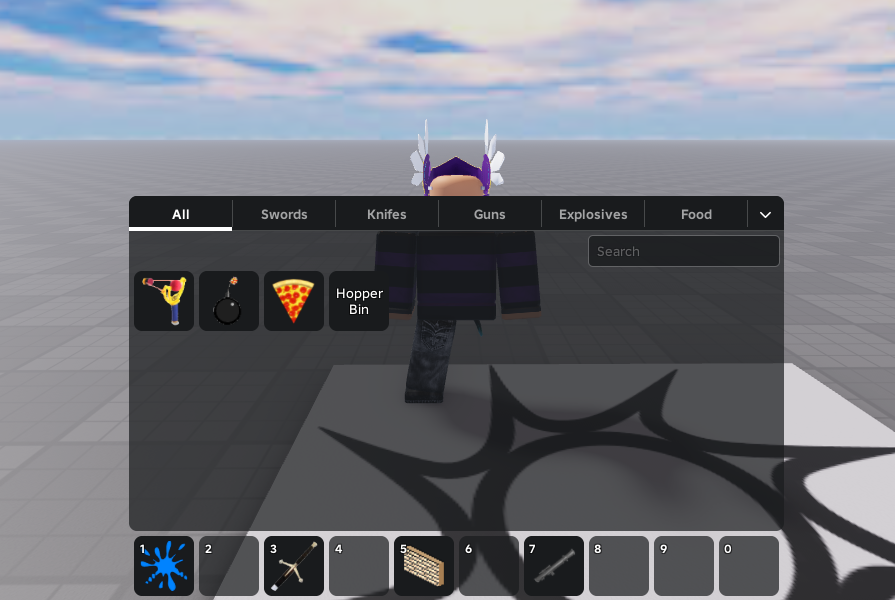
Layout
- 10 hotbar slots
- 4 inventory rows
Keyboard Shortcuts
| Key | Action |
|---|---|
1 to 0 | Equip / Unequip corresponding hotbar slots (1 to 10). |
| Backquote | Toggle the main inventory panel open or closed. |
Mouse Actions
- Quick Move to Hotbar: Double-click any item in your inventory to quickly move it to an empty slot in the hotbar.
- Drag & Drop: When the inventory panel is open, you can drag and drop items to organize your layout:
- Add/Swap in Hotbar: Drag an item from the inventory and drop it onto a hotbar slot to place or swap it.
- Remove from Hotbar: Drag an item from your hotbar and drop it anywhere outside to return it to the inventory.